
Image Production Classroom in a Book Exercises
- Kyle Wright
- Feb 10, 2021
- 2 min read
Updated: Feb 20, 2021
This is the full list of all the Adobe Classroom in a Book Exercises for Photoshop. This post will be updated as new chapters are completed!
*Note that the first 3 chapter exercises are images only, as the file was exported to an image file before being saved as a .psd file.
Chapter 1 - Getting to Know the Work Area

This task was just a basic introduction to the basic functions and toolbar in Photoshop. The task was to use a colour picker tool to copy the colour from the top text layer, and create a new layer at the bottom of the image with text.
This was a fairly straightforward task, and once I familiarised myself with the toolbar layout and keyboard shortcuts, I got through it fairly easily.
Chapter 3 - Working with Selections
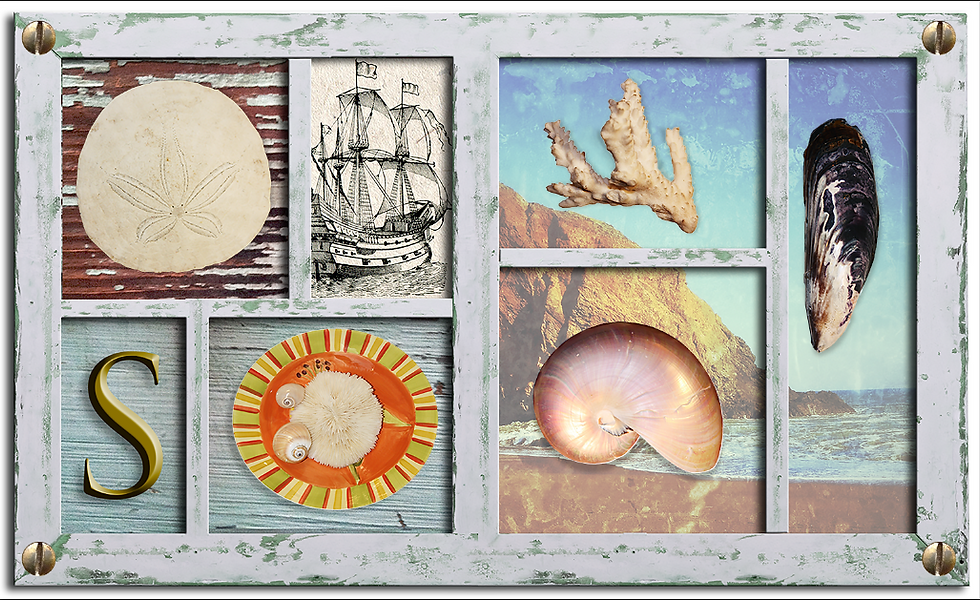
This task introduced us to the different selector tools available in Photoshop. Using these different tools, we cut and pasted different objects onto parts of the photo frame you see here.
The task was easy to follow, but some tools of the selector tools, such as the lasso were tedious at times as you had to be precise with your mouse control. Trying the tool on my iPad Pro I found this particular tool much easier to use, because of the Apple Pencil support the Photoshop app has on iPad.
Chapter 4 - Layer Basics

Chapter 4 introduced us to the basics of layering in Photoshop. Starting out with a simple image of a pineapple on a white background, we learned how to unmask layers, import layers from different open projects and add certain elements such as gradient filters, borders and rendering elements.
Again the task was fairly simple to follow, with most issues just coming from not being used to the layout of certain menus within the program itself.
Chapter 6 - Masks and Channels

The objective of this task was to remove the background of the original image, as well as creating a shadow layer, changing the colour of the model's glasses and tilting their head upwards.
Having not fully gotten to grips with the ins and outs of Photoshop this wasn't as hard as I anticipated and gave me confidence in using the program to a higher ability than before.


Comments